Education
Test Automation for Android: Tools, Setup, and What Actually Works in 2026


Android testing is harder than most teams expect when they start. Not because the tools are bad; they are genuinely excellent, but because Android’s device landscape is unlike anything else in software engineering.
Android runs across 24,000+ distinct device configurations with different OEM skins, screen sizes, and OS versions. A test that passes perfectly on a Pixel emulator can fail silently on a Samsung Galaxy running One UI, a Xiaomi running MIUI, or a Realme running ColorOS, all running the same Android version, all behaving differently. A LambdaTest survey of 1,600+ QA professionals found that engineers spend 7.8% of their time fixing flaky tests and 10.4% on setting up and maintaining test environments.
This article covers the tools, the setup decisions, and the real-world tradeoffs that determine whether your Android automation programme works at scale.
The best Android automation tools in 2025–2026 are Espresso (native Android UI testing, free, fast, requires Kotlin/Java), Appium with the UIAutomator2 driver (cross-platform, open-source, large ecosystem), and Maestro (YAML-based, lightweight, supports Android real devices and emulators).
Each of these tools exists because it solves a different problem. The mistake most teams make is choosing a tool before defining the problem. The right question isn’t “which tool is best?”, it’s “what type of tests do we need, and who on our team will maintain them?”
Espresso is Google’s official UI testing framework for Android, and for teams building Android-native applications, it remains the strongest choice in 2026. It runs in-process with your application, which means it is fast, stable, and deeply integrated with the Android build system.
Espresso is an open-source Android automation testing tool developed by Google as part of the Android Testing Support Library, one of the most widely used Android testing frameworks. It enables testing of both Android native views and hybrid web views and facilitates black box testing, allowing QA professionals to assess an app’s components throughout the development cycle.
Espresso is Android-only. If you also ship on iOS, you need a completely separate test suite (XCUITest). It’s also white-box: you need access to the app’s source code and build system, which means your QA team needs to work inside the development environment.
If your QA team doesn’t have access to the codebase or works separately from the development team, Espresso creates a structural dependency that slows you down.
Android-only product, QA engineers embedded in the development team, Kotlin/Java tech stack, need for maximum speed in CI.
Appium remains the most established cross-platform mobile automation framework. It has the largest ecosystem – WebDriver-protocol drivers, plugins, language bindings in Java, JavaScript, Python, Ruby, and .NET and deep integrations with every major device cloud (BrowserStack, Sauce Labs, LambdaTest) and CI tool (Jenkins, GitHub Actions, GitLab, Azure DevOps).
The significant development in Appium in the last two years is the New Architecture. The New Architecture, stable since 2024, replaced the old bridge with synchronous native module calls, which cut startup times by up to 40% and improved animation smoothness. If your team tried Appium two or three years ago and abandoned it because of setup friction and slow execution, the 2026 version is meaningfully better.
For Android specifically, Appium uses the UIAutomator2 driver, which gives access to system-level interactions, notifications, settings, and multi-app flows that Espresso can’t reach. For fintech applications that need to test payment flows involving system-level notification handling, permission dialogs, or interactions with banking apps, UIAutomator2’s cross-app capabilities are not optional; they are essential.
Cross-platform team (Android + iOS from a single codebase), QA team separate from development, black-box testing requirement, need for system-level interaction testing.
UIAutomator2 deserves mention as a standalone tool beyond its role as the Appium driver. UIAutomator supports interaction with Android device UI components at both the application and system levels. It provides cross-app UI testing, interacting with multiple apps during a single test flow that involves system settings, notifications, or third-party apps, and direct access to system UI elements such as permission dialogs, notifications, and quick settings, without needing the app’s source code.
For teams testing payment apps that need to validate OTP flows, bank redirect handling, or UPI deep links, UIAutomator2’s ability to interact across application boundaries is the only tool that reaches those flows reliably.
This is the most consequential setup decision in Android testing, and the one teams most frequently get wrong.
Device manufacturers ship custom OS skins and patches that emulators do not track. Samsung One UI, Xiaomi MIUI, and Oppo ColorOS all introduce behavioural differences that only surface on actual hardware.
A test passing on Pixel can fail on Samsung because One UI changes animation timing. This is not an edge case. For any consumer-facing Android product with users spread across India’s device market, where Samsung, Xiaomi, Realme, and Vivo collectively account for over 70% of active devices, OEM skin differences represent a real and recurring source of production defects.
The practical framework for 2026:
Use emulators for: Development iteration, unit test execution, debugging during active feature work, and early CI pipeline stages where speed matters most.
Use real devices for: Regression testing, release validation, payment flow testing, biometric authentication testing, network condition testing, and any flow involving OEM-specific behaviour.
Apps that exceed a 1.09% crash rate are classified by Google’s Android Vitals benchmarks as exhibiting “bad behaviour” and receive reduced Play Store visibility. Most teams cross that threshold not because they’re shipping broken code intentionally, but because mobile surfaces a class of bugs that web testing simply doesn’t prepare you for.
How many real devices do you need? Pull your analytics data from Firebase, Mixpanel, Amplitude, or your own telemetry. Sort devices by session count. Your top 15–20 devices cover 80–90% of your active users. Test those first. For most Indian fintech teams, this means Samsung Galaxy (multiple tiers), Xiaomi Redmi series, Realme, and at least one stock Android Pixel for baseline comparison.
GitHub Actions is an ideal choice for Android CI/CD. It’s seamlessly integrated into GitHub, free for public repositories, and provides robust support for the Android ecosystem, making it a perfect tool to automate your mobile workflows.
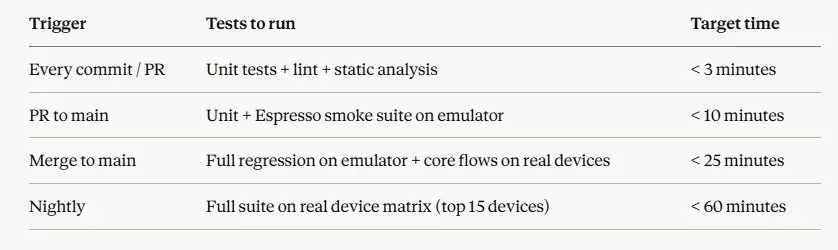
The practical trigger matrix for Android automation:
The frustrations with Android testing in production are consistent themes among senior mobile engineers. Ryan Harter, a staff Android engineer who has written extensively on testing architecture, has made the point that the biggest risk in Android testing is not the tool choice but the test structure and hence, teams that write tests tightly coupled to implementation details end up rewriting tests every time the product changes, not because the product broke, but because the test design was fragile from the start.
For a practical hands-on setup walkthrough, the YouTube channel Philipp Lackner – one of the most widely followed Android development channels has videos covering Espresso and Compose UI Testing setup that are consistently recommended by Android developers getting started with test automation.
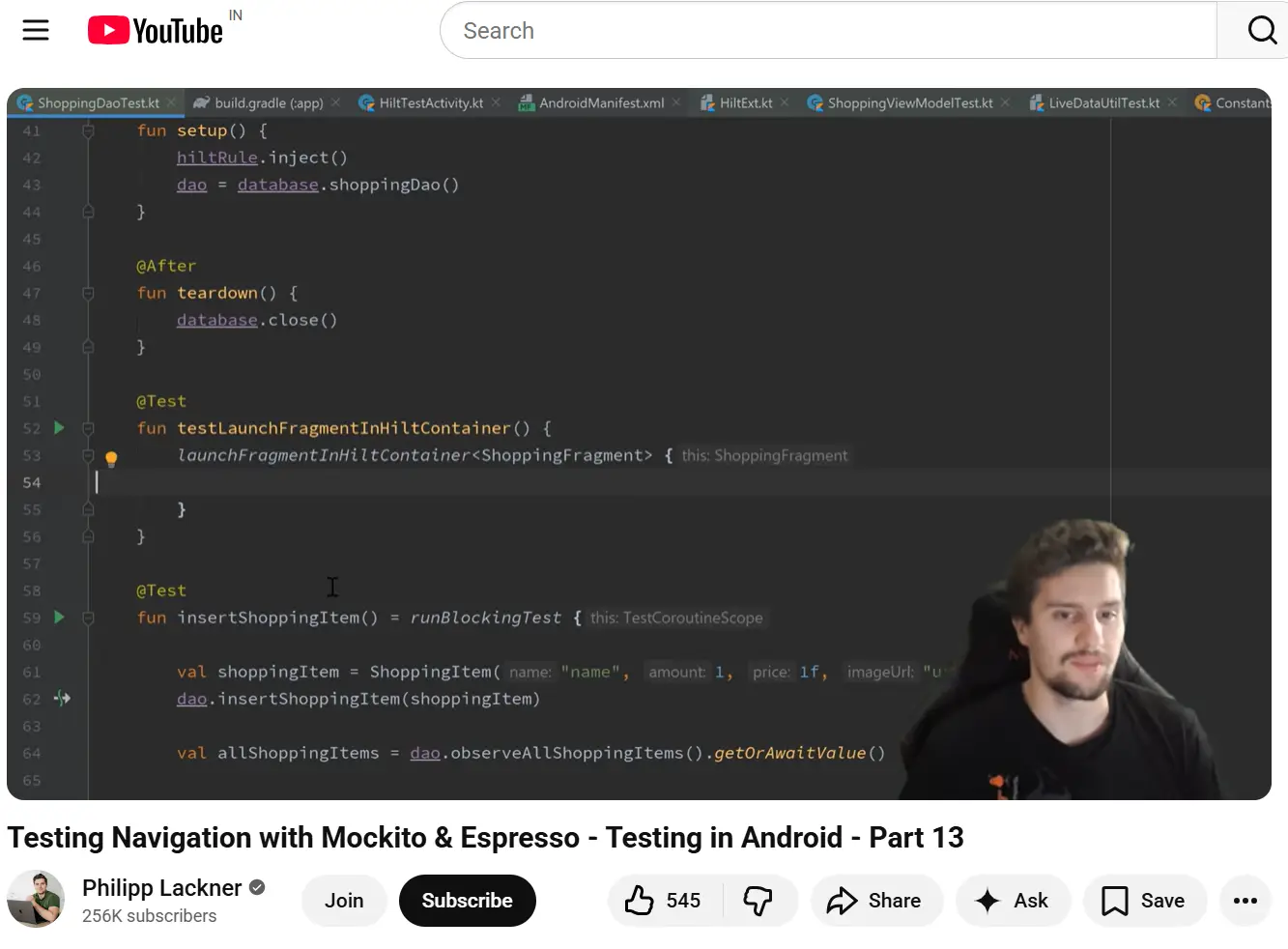
His explanations are code-first and pragmatic rather than theoretical, which makes them directly applicable to production setups.
For Appium specifically, the Appium Pro newsletter and associated YouTube content by Jonathan Lipps, one of Appium’s core maintainers, remains the most authoritative source for understanding the New Architecture’s implications and migration path from older Appium setups.
Running everything on emulators. Emulators are useful for early development and debugging, but they cannot replicate issues like battery drain, memory leaks, or network handoffs. Production defects on OEM devices are not hypothetical; they are a consistent source of one-star reviews and support escalations.
No flaky test policy. Engineers spend 7.8% of their time fixing flaky tests. Without a formal quarantine policy – identify, tag, fix or delete within the sprint – flaky tests accumulate until engineers stop trusting failures, and then the entire feedback loop breaks.
Automating before the feature stabilises. Automating UI tests on features that change every sprint creates instant maintenance debt. Wait for a feature to reach stability before writing E2E tests against it. Write unit tests during active development.
Not budgeting for maintenance. Addressing device fragmentation is a leading category of testing overhead in 2024–2025. Android’s OS update cadence, Play Store policy changes, and OEM skin variations mean your test suite will require ongoing maintenance proportional to how much of the real device surface area you cover. Budget 20–30% of QA capacity for maintenance from day one.
Android test automation in 2026 is mature, well-tooled, and genuinely effective when set up with the right architecture. The teams that struggle are not struggling because the tools are bad; they are struggling because they chose tools before defining the testing problem, skipped real device coverage, or underestimated maintenance overhead.
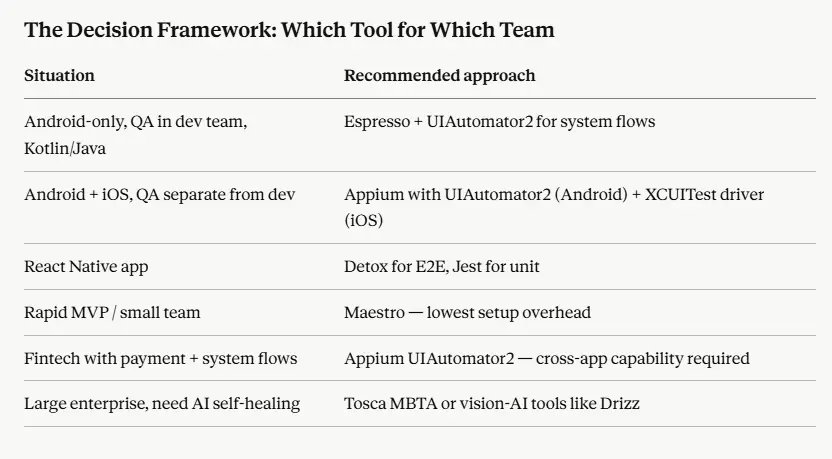
Start with a clear answer to three questions: Is this Android-only or cross-platform? Is QA embedded in development or separate? Do you need system-level or cross-app interactions? Those three answers will tell you your tool stack. Everything else is set up.

Future Begins With Trust
A 30-minute conversation with an engineer who has done this before — not a sales call. We will tell you what we would do differently, whether or not you work with us.