Education
How to Write a Test Automation Plan That Works


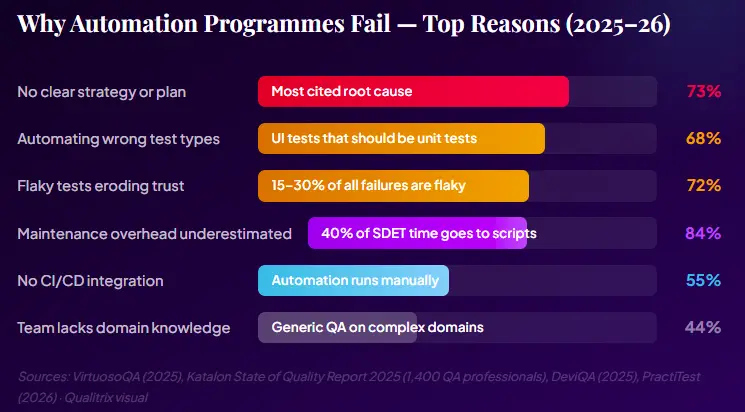
Here’s a number that should stop any QA leader cold: 73% of test automation projects fail to deliver their promised ROI, and 68% are abandoned within 18 months. That’s not a niche finding from an outlier study; it’s the consistent picture across multiple published analyses of automation programmes worldwide in 2025.
What’s more uncomfortable is the cause. When you dig into these failures, the root is rarely a bad tool choice or a technically incompetent team. It’s a missing or inadequate automation plan, a vague brief handed to engineers who then automate everything they can reach, produce a suite nobody trusts, and quietly return to running tests by hand.
According to DeviQA’s 2025 analysis, SDETs in poorly planned programmes spend up to 40% of their time maintaining existing scripts rather than creating new test coverage. That’s not automation; that’s a maintenance burden with a CI/CD pipeline attached.

Joe Colantonio, host of the TestGuild podcast, the longest-running podcast dedicated to automation testing, has interviewed hundreds of QA leaders and consistently points to the same root cause of automation failure: a lack of upfront strategic clarity.

Link – https://www.youtube.com/watch?v=yLhFZ530T6E.
The data backs this up. A 2024 State of Test Automation survey found that teams without a documented strategy reported significantly higher maintenance overhead and lower automation ROI than teams with even a basic written plan. The plan does not need to be a 50-page document, but it does need to exist.
A test automation plan is not a list of test cases to write. It’s not a tool selection document. It’s not a coverage percentage target. Those are outputs of a plan — not the plan itself.
A real automation plan answers seven fundamental questions before a single line of test code is written:
PractiTest’s 2026 strategy checklist puts it cleanly: automation works when teams automate the right tests, integrate them into delivery pipelines, and maintain them continuously as the product evolves. When teams fail, it’s because they automate too much, too early, or without answers to those seven questions.
According to ISTQB, a good test plan transforms a checklist into an actionable strategy. In automation specifically, it must answer: What business problems are we solving? Which tests deliver the most value when automated? How will we know if we are succeeding?
Before touching a single tool or framework, your automation plan must answer: Why are we doing this? Vague goals like “improve test coverage” or “reduce QA time” are not enough. Your objectives need to be SMART. Specific, Measurable, Achievable, Relevant, and Time-bound.
Common Mistake: “We want to automate everything.” This is not an objective; it is a recipe for wasted budget. Automation for its own sake delivers no value. Every automated test must justify its existence with a business reason.
Good SMART Automation Objectives
Automate 100% of critical-path regression tests within 3 months, reducing regression cycle time from 3 days to 4 hours.
Achieve 75% automation coverage across the checkout and payment flows by Q3 2026, reducing post-release defect escape rate by 40%.
Integrate automated smoke tests into the CI/CD pipeline so every pull request is validated within 10 minutes.
Reduce test maintenance overhead from 40% of the QA team’s sprint time to under 15% within 6 months by adopting the Page Object Model.
Notice what these objectives have in common: they are tied to business outcomes (release speed, defect rate, team capacity), not just technical metrics. When you can speak to your CFO in these terms, automation secures the budget. When you cannot, it doesn’
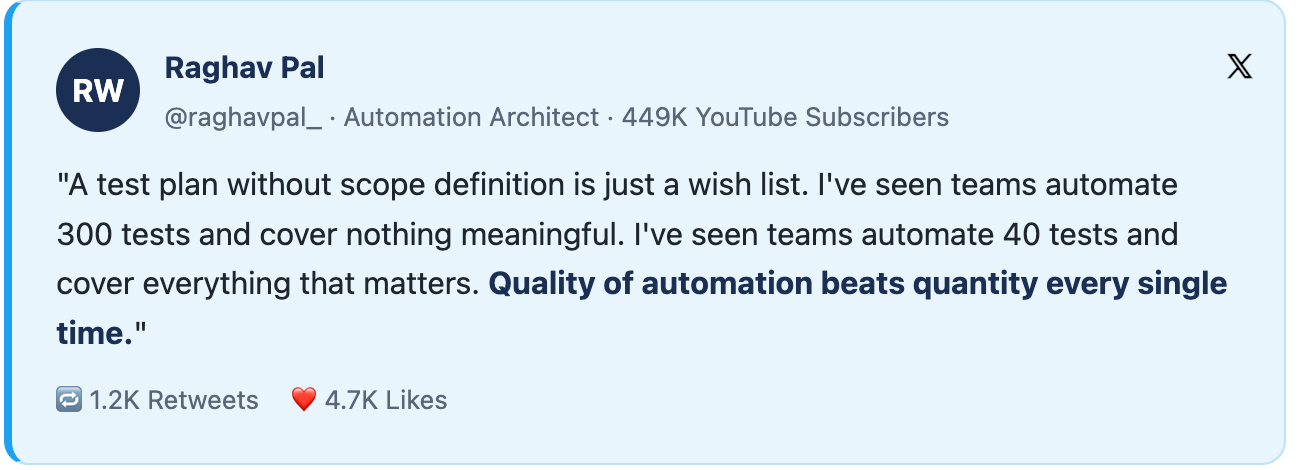
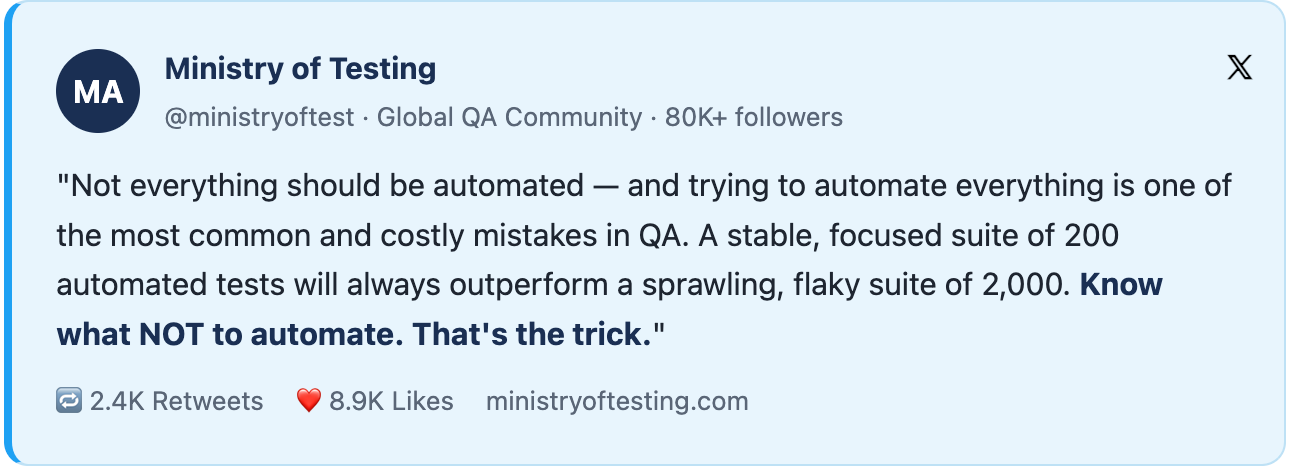
Scope definition is where most automation plans save or waste the most money. Automating the wrong tests, typically too many UI-layer end-to-end tests, not enough API and unit tests, creates a slow, brittle, expensive suite that teams eventually abandon.
The testing pyramid is the most important mental model for scope planning. It prescribes where automation investment should be concentrated:
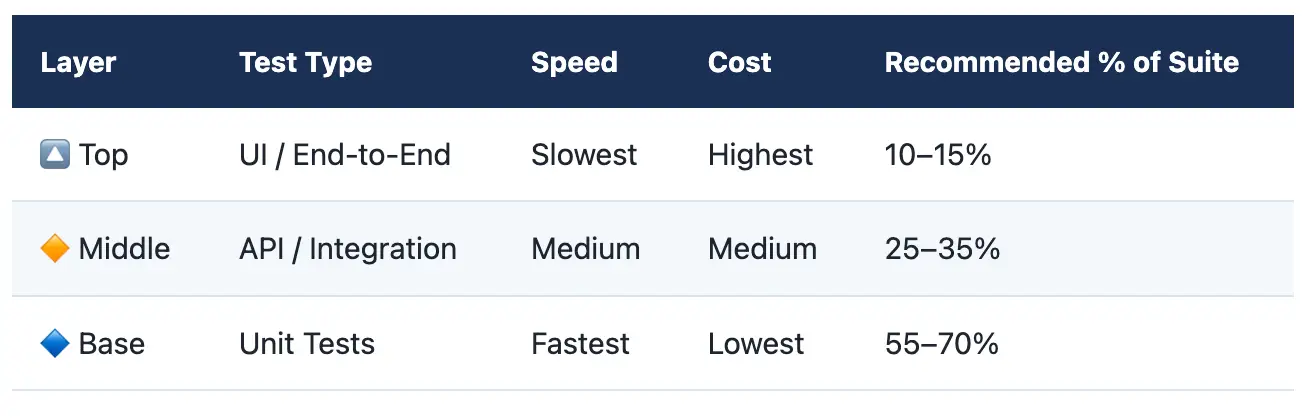
Pro tip: Research from QASource’s engineering team found that teams that automate too many UI tests without realising that most defects appear in the API or integration layers end up with slow test runs, flaky results, and little business value despite high script counts.
|
Good Candidates for Automation |
Bad Candidates for Automation |
|
Regression test suites for stable features |
Exploratory testing (requires human intuition) |
|
Critical-path smoke tests (login, checkout, core flows) |
Tests for features changing every sprint |
|
API contract validation |
Usability and accessibility audits |
|
Data-driven tests (large input matrices) |
One-off edge cases unlikely to recur |
|
Performance and load tests |
Tests involving visual judgment (“Does this look right?”) |
|
Security regression scans |
New feature testing before acceptance criteria are stable |
Tool selection is the step most teams do first. It should be done third, after the objectives and scope are clear. The right tool is the one that best serves your objectives and fits your team’s skills, not the one with the most GitHub stars.
|
Application Type |
Recommended Framework |
Language |
Qualitrix Recommendation |
|
Web UI (modern SPA) |
Playwright |
TypeScript/Python |
First choice for new projects |
|
Web UI (legacy/cross-browser) |
Selenium |
Java/Python/C# |
Solid for enterprise legacy stacks |
|
Mobile (iOS + Android) |
Appium |
Java/Python |
Pair with BrowserStack Device Farm |
|
API / REST |
RestAssured / Postman-Newman |
Java / JS |
Essential for all API-heavy platforms |
|
Enterprise (SAP, Salesforce) |
Tricentis Tosca |
Scriptless/model-based |
Qualitrix-certified Tricentis partner |
|
Performance / Load |
Gatling / k6 |
Scala / JS |
Best for CI/CD-integrated load tests |
Link – https://www.youtube.com/watch?v=M_hxCS7D6l4

Beyond the tool itself, your plan must specify the architectural pattern your framework will use. The three most widely adopted patterns are:
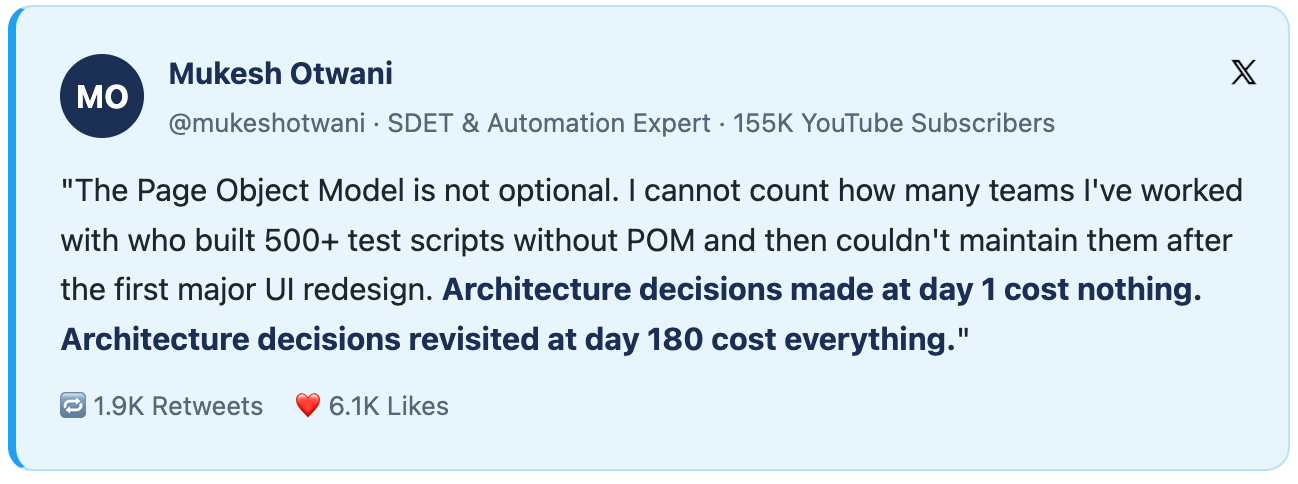
Here’s the hidden cost that destroys automation ROI: 84% of “successful” automation programmes require 60%+ of QA time for ongoing maintenance. Teams spend the first three months building a suite, then spend the next year keeping it from falling apart.
This is entirely avoidable with the right architecture decisions made before the first test is written.
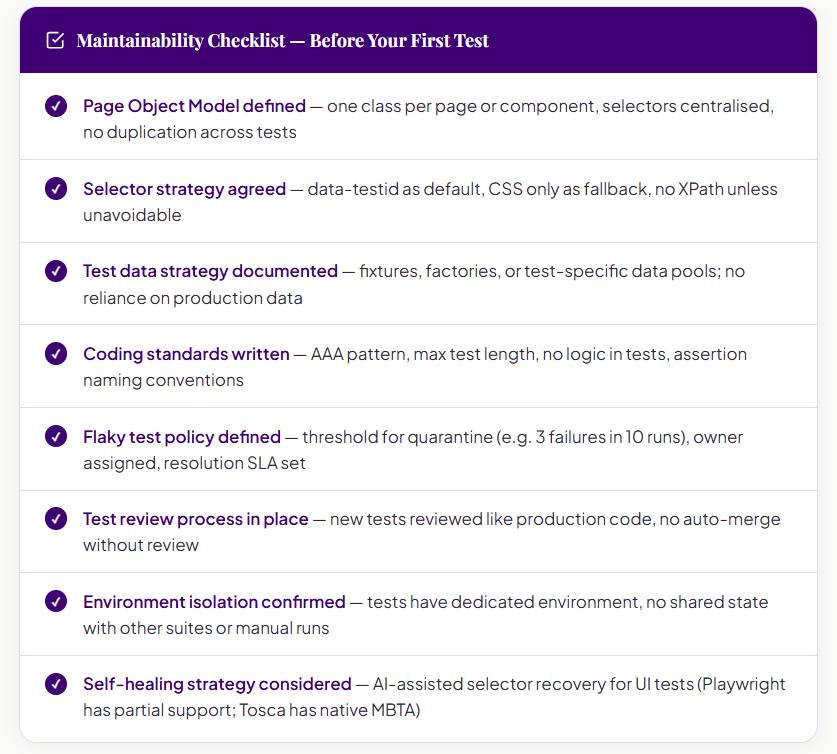
The Page Object Model (POM) is not optional for any suite beyond a trivial scale. It separates the mechanics of how you interact with a UI from what you’re testing. When a payment screen changes its button ID, you update one class — not 47 test files. In fintech environments where UI changes with every regulatory update or product iteration, POM is the difference between a maintainable suite and a constant fire drill.
The single biggest cause of test brittleness is selector choice. CSS paths break. Element indexes break. Class names change with every build tool update. The rule is simple: use data-testid attributes added by developers specifically for testing. They’re stable by convention, not by accident. If your developers won’t add them, negotiate that into your definition of done. It’s a one-line change that eliminates an entire category of test maintenance.
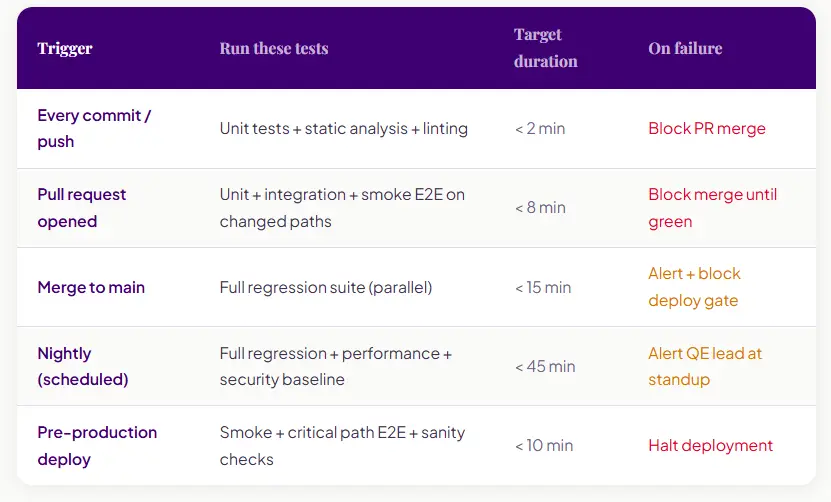
An automation suite that runs manually is not automation; it’s scripted testing. The value of automation compounds only when tests are run automatically on every meaningful code event. According to ThinkSys’s 2026 QA Trends Report, 89.1% of QA teams have adopted CI/CD pipelines. That means the bar for “minimum viable automation” now includes pipeline integration by default.
The pipeline design question is not “should we integrate?” It’s “which tests run on which trigger, and what happens when they fail?”
The most common mistake in automation reporting is tracking the wrong number. Teams celebrate “80% test coverage” as success, but coverage percentage tells you nothing about whether the coverage is meaningful, maintained, or trusted by the people running it.
The metrics that matter are those connected to the original business outcome. If your automation plan was designed to accelerate release velocity, your KPIs should measure release velocity. If it was designed to reduce production defects, measure defect escape rate. Coverage percentage is a secondary indicator, not a primary success metric.
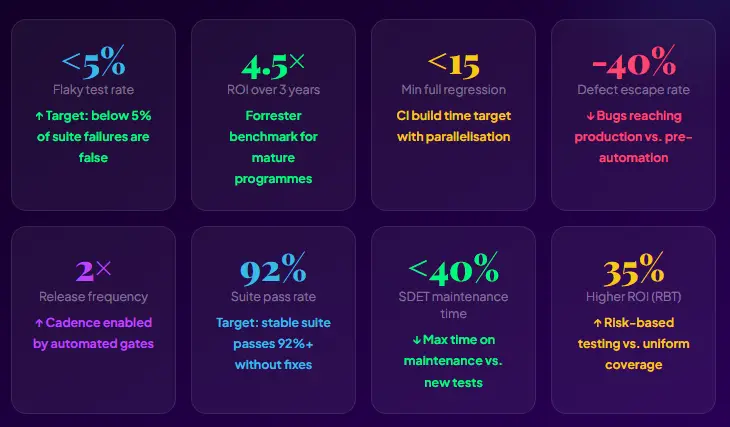
A test automation plan that works is not a document you write once and file away. It’s a living product specification for your quality engineering capability. It answers the seven questions, allocates tests correctly across the pyramid, defines ownership, specifies what success looks like, and gets reviewed quarterly against reality.
The difference between the 27% of automation programmes that succeed and the 73% that fail is rarely talent or tooling. It’s whether someone sat down before writing the first test and answered.
Want a second opinion on your test automation plan? Book a free automation plan review.

Future Begins With Trust
A 30-minute conversation with an engineer who has done this before — not a sales call. We will tell you what we would do differently, whether or not you work with us.